
目次
はじめに
データをマイグレーションする際にはユーザーなどLiferayの既存のエンティティに対してWeb APIを提供しているので、これを用いることで容易にデータマイグレーションが可能です。
とはいえ、Liferayでは数百万人規模のユーザーを管理するような大規模なポータルを構築する事例もよくあります。
この規模のデータをマイグレーションする際にWeb APIで取り込むには性能面での課題がでてきます。
ですので、こういう際に我々がよく提案するアプローチとして処理の並列化を提案します。
(もちろん、ミドルやハードのチューニングも行いますが)
単純にWeb APIの呼び出しを並列・多重化してもよいですが、Web APIの実行毎に認証などのオーバーヘッドが起こるのでサーバーサイドで並列・多重実行するカスタマイズを紹介したいと思います。
このカスタマイズはLiferayにOSGiモジュールを作成してデプロイして動作するので、Liferay PaaSとLiferay Self Hostedの方を対象にしています。
Liferay SaaSではOSGiのデプロイをサポートしていないのでご利用になれません。
実現イメージ
今回は大量ユーザーの登録・更新を想定してユーザーの登録/更新/削除を並列実行すると想定します。
実行スレッド数などはOSGiの設定を読み込んで並列処理をします。
イメージとしては下図のとおりです。
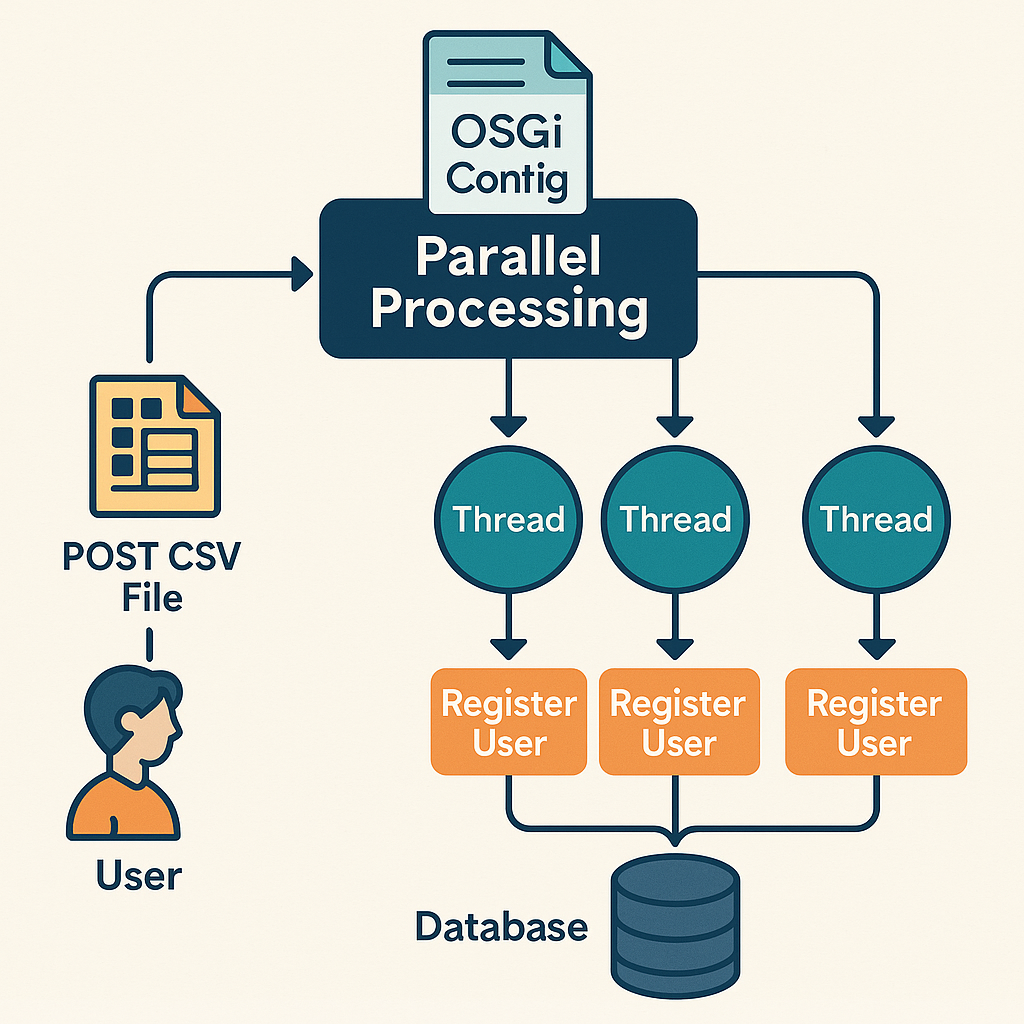
並列処理の実装はLiferayとして特殊な実装は必要ありません。
LiferayはJavaで実装されており、OSGiバンドルを作成することでプラガブルにカスタマイズを適用することができます。
ここではJava1.5から実装されているConcurrency Utilitiesを採用しますが、昔ながらのThreadクラスの実装やFork/Joinフレームワークなど、お好みの実装で構いません。
並列化の実装時に考慮する必要がある点として以下が挙げられます。
- 多重度をどうするか:
環境のCPUや対象データ件数などをもとに検討します。 - Transactionブロックの単位をどうするか:
LiferayはバックエンドのRDBMSにデータを保存するので、
1Transactionで処理する件数も性能に影響します。
これらはプロジェクトや環境毎に変わりうるものなので、LiferayではConfiguration Frameworkを用いて表現するのが一般的です。
Configuration FrameworkについてはLiferay Learnのサイトでも紹介されていますので、コチラをご参照ください。
コーディング
CSVをパースする処理などは割愛しますが、ここでは以下の処理を実装します。
- Configurationから以下の情報を取得
- 並列スレッド数
- Transactionブロック単位
- CSVからTransactionブロック単位毎に並列化
- 1Transactionブロックごとに1Transactionに纏めるてユー~あ更新
では、実際のコードです。
Configuration
マルチテナントでの利用も考慮して、仮想インスタンス毎に設定を保持するようにしています。
@Meta.OCD(
  id = "jp.co.oxygendesign.importer.configration.UserCSVImportConfigration",
  localization = "content/Language", name = "user-csv-import-configuration-name"
)
public interface UserCSVImportConfigration {

  @Meta.AD(deflt = "true", name = "enabled", required = false)
  public boolean enabled();

  // 並列スレッド数
  @Meta.AD(
      deflt = ImporterConstants.DEFAULT_IMPORT_THREAD_COUNT,
      name = "import-thread-count",
      min = ImporterConstants.MINIMUM_IMPORT_THREAD_COUNT,
      required = false, type = Type.Integer
  )
  public int importThreadCount();

  // Transactionブロック単位
  @Meta.AD(
      deflt = ImporterConstants.DEFAULT_IMPORT_TRANSACTION_BLOCK_UNIT,
      name = "import-transaction-block-unit",
      min = ImporterConstants.MINIMUM_IMPORT_TRANSACTION_BLOCK_UNIT,
      required = false, type = Type.Integer
  )
  public int transactionBlockUnit();
}
CSVの並列処理
CSVを受け取ってTransactionブロックごとに分割し並列処理を行う、Concurrency UtilitiesのExecutorServiceを用いて並列処理を呼び出している部分です。
List<Future<List<LineResult>>> futures = new ArrayList<>();
int lineCount = 0;

// CSVをパース
try (CSVParser csvParser = CSVParser.getInstance(companyId, User.class.getName(), is)){

  // 仮想インスタンスのConfigurationを取得
  UserCSVImportConfigration config = configurationProvider.getCompanyConfiguration(
    UserCSVImportConfigration.class, companyId);

  // Configから並列スレッド数を取得
  int threadCount = config.importThreadCount() > 0 ? config.importThreadCount() : 1;

  // 並列スレッド数を元にExecutorServiceを生成
  ExecutorService executor = Executors.newFixedThreadPool(threadCount);

  List<Callable<List<LineResult>>> callables = new ArrayList<>();
  Iterable<String> lines = csvParser.getIterator();

  // TransactionブロックごとのCSVの行を保持したMap<行番号、CSV行内容>
  Map<Integer, UserCSVModel> transactionBlockedCSVModelMap = new HashMap<>();
  int transactionBlockUnit = config.transactionBlockUnit();

  for (String line : lines) {
    lineCount++;

    // 1Transactionブロック
    if (transactionBlockedCSVModelMap.size() == transactionBlockUnit) {

      // Transactionブロックを実行するCallableタスク
      Callable<List<LineResult>> callable = new UserCSVCallable(
          companyId, transactionBlockedCSVModelMap, serviceContext);

      callables.add(callable);

      transactionBlockedCSVModelMap = new HashMap<>();
    }

    UserCSVModel csvModel = (UserCSVModel) csvParser.parse(line);
    transactionBlockedCSVModelMap.put(lineCount, csvModel);
  }

  if (MapUtil.isNotEmpty(transactionBlockedCSVModelMap)) {
    Callable<List<LineResult>> callable = new UserCSVCallable(
        companyId, transactionBlockedCSVModelMap, serviceContext);

    callables.add(callable);
  }

  try {
    futures = executor.invokeAll(callables);
  } catch (InterruptedException e) {
    throw new PortalException(e);
  } finally {
    executor.shutdown();
  }
}
Callableタスク
java.util.concurrent.CallableはConcurrency Utilitiesで提供される戻り値を持つことができる並列タスクです。
ここでは割愛しますが、これを実装して登録結果を返して集計することも可能です。
TransactionInvokerUtil.invokeを利用することで引数で渡した処理時に共通のTransactionブロックで実行します。
これを利用しない場合は各行毎にTransactionが分離するので処理性能が劣化します。
public class UserCSVCallable implements Callable<List<LineResult>>{

  public UserCSVCallable(
      long companyId, Map<Integer, UserCSVModel> csvModelMap, ServiceContext serviceContext)
          throws ConfigurationException {
    this.companyId = companyId;
    this.csvModelMap = csvModelMap;
    this.serviceContext = serviceContext;

    this.config = ConfigurationProviderUtil.getCompanyConfiguration(
      UserCSVImportConfigration.class, companyId);
  }

  @Override
  public List<LineResult> call() throws Exception {

    // for bypassing permission checks
    ExportImportThreadLocal.setPortletImportInProcess(true);

    List<LineResult> results;
    try {
      results = TransactionInvokerUtil.invoke(
          _transactionConfig,
          () -> processLines(companyId, csvModelMap, serviceContext));

    } catch (Throwable throwable) {
      throw new Exception(throwable);
    }

    return results;
  }

  protected User addUser(
    long companyId, long creatorUserId, UserCSVModel csvModel,
    ServiceContext serviceContext) throws PortalException {

    validateAddUser(companyId, csvModel);

    long[] organizationIds = getOrganizationIds(
      companyId, creatorUserId, csvModel.getDepartments());
    long[] roleIds = getRoleIds(companyId, creatorUserId, csvModel.getRoles());

    Calendar birthdayCalendar = getBirthdayCalendar(csvModel);
    int birthdayYear = Objects.isNull(birthdayCalendar)
      ? 1900 : birthdayCalendar.get(Calendar.YEAR);
    int birthdayMonth = Objects.isNull(birthdayCalendar)
      ? 0 : birthdayCalendar.get(Calendar.MONTH);
    int birthdayDay = Objects.isNull(birthdayCalendar)
      ? 1 : birthdayCalendar.get(Calendar.DAY_OF_MONTH);
    Locale locale = Validator.isNull(csvModel.getLocale())
      ? Locale.JAPAN : new Locale(csvModel.getLocale());
    boolean male = Validator.isNull(csvModel.getGender())
      ? true : GetterUtil.getBoolean(csvModel.getGender());

    return UserLocalServiceUtil.addUser(
        creatorUserId, companyId, true, null, null, false, csvModel.getScreenName(),
        csvModel.getEmailAddress(), locale, csvModel.getFirstName(),
        csvModel.getMiddleName(),
        csvModel.getLastName(), 0L, 0L, male, birthdayMonth, birthdayDay, birthdayYear,
        csvModel.getJobTitle(), UserConstants.TYPE_REGULAR, null, organizationIds, roleIds,
        null, false, serviceContext);
  }

  protected void deleteUser(long companyId, UserCSVModel csvModel) throws PortalException {

    User user = getUser(companyId, csvModel);

    UserLocalServiceUtil.deleteUser(user);
  }

  protected String processError(int lineNumber, String templateMsg, Object... args) {
    return String.format(templateMsg, lineNumber, args);
  }

  protected String processError(int lineNumber, Exception e) {
    String exceptionMessage = e.getMessage();

    if (e instanceof ContactNameException.MustHaveFirstName) {
      exceptionMessage = String.format(MSG_EMPTY_VALUE, config.firstNameColumnName());
    }
    else if (e instanceof ContactNameException.MustHaveLastName) {
      exceptionMessage = String.format(MSG_EMPTY_VALUE, config.lastNameColumnName());
    }
    else {
      exceptionMessage = e.getMessage();
    }

    return String.format(MSG_EXCEPTION,  lineNumber, exceptionMessage);
  }

  protected List<LineResult> processLines(
      long companyId, Map<Integer, UserCSVModel> csvModelMap,
      ServiceContext serviceContext) {

    List<LineResult> results = new ArrayList<>();

    for (Map.Entry<Integer, UserCSVModel> csvModelEntry : csvModelMap.entrySet()) {
      LineResult result = null;
      int lineCount = csvModelEntry.getKey();
      UserCSVModel csvModel = csvModelEntry.getValue();

      try {
        // Add User
        if (csvModel.isAddMode()) {
          addUser(companyId, serviceContext.getUserId(), csvModel, serviceContext);
          result = new LineResult(lineCount, LineResult.INSERTED);
        }
        // Update User
        else if (csvModel.isModifyMode()) {
          updateUser(companyId, serviceContext.getUserId(), csvModel, serviceContext);
          result = new LineResult(lineCount, LineResult.UPDATED);
        }
        // Delete User
        else if (csvModel.isDeleteMode()) {
          deleteUser(companyId, csvModel);
          result = new LineResult(lineCount, LineResult.DELETED);
        }
      }
      catch(Exception e) {
        String msg = processError(lineCount, e);
      }

      results.add(result);
    }

    return results;
  }

  protected void updateUser(
      long companyId, long creatorUserId, UserCSVModel csvModel,
      ServiceContext serviceContext) throws PortalException {

    User user = getUser(companyId, csvModel);
    Contact contact = user.getContact();

    long[] groupIds = null;
    long[] organizationIds = getOrganizationIds(
      companyId, creatorUserId, csvModel.getDepartments());
    long[] roleIds = getRoleIds(companyId, creatorUserId, csvModel.getRoles());
    long[] userGroupIds = null;
    List<UserGroupRole> userGroupRoles = null;
    String firstName = Validator.isNull(csvModel.getFirstName())
      ? user.getFirstName() : csvModel.getFirstName();
    String middleName = Validator.isNull(csvModel.getMiddleName())
      ? user.getMiddleName() : csvModel.getMiddleName();
    String lastName = Validator.isNull(csvModel.getLastName())
      ? user.getLastName() : csvModel.getLastName();
    String jobTitle = Validator.isNull(csvModel.getJobTitle())
      ? user.getJobTitle() : csvModel.getJobTitle();
    String languageId = Validator.isNull(csvModel.getLocale())
      ? user.getLanguageId() : csvModel.getLocale();
    String timeZoneIdId = Validator.isNull(csvModel.getTimeZone())
      ? user.getTimeZoneId() : csvModel.getTimeZone();
    boolean male = Validator.isNull(csvModel.getGender())
      ? user.isMale() : GetterUtil.getBoolean(csvModel.getGender());

    String screenName = Validator.isNull(csvModel.getNewScreenName())
      ? user.getScreenName() : csvModel.getNewScreenName();
    String emailAddress = Validator.isNull(csvModel.getNewEmailAddress())
      ? user.getEmailAddress() : csvModel.getNewEmailAddress();

    Calendar birthdayCalendar = getBirthdayCalendar(csvModel);
    Date birthday = contact.getBirthday();
    int birthdayMonth = 0, birthdayDay = 1, birthdayYear = 1970;

    if (Objects.nonNull(birthday)) {
      Calendar cal = Calendar.getInstance();
      cal.setTime(birthday);

      birthdayMonth = cal.get(Calendar.MONTH);
      birthdayDay = cal.get(Calendar.DAY_OF_MONTH);
      birthdayYear = cal.get(Calendar.YEAR);
    }

    birthdayYear = Objects.isNull(
      birthdayCalendar) ? birthdayYear : birthdayCalendar.get(Calendar.YEAR);
    birthdayMonth = Objects.isNull(
      birthdayCalendar) ? birthdayMonth : birthdayCalendar.get(Calendar.MONTH);
    birthdayDay = Objects.isNull(
      birthdayCalendar) ? birthdayDay : birthdayCalendar.get(Calendar.DAY_OF_MONTH);

    UserLocalServiceUtil.updateUser(
        user.getUserId(), null, null, null, false,
        user.getReminderQueryQuestion(), user.getReminderQueryAnswer(),
        screenName, emailAddress, false, null, languageId, timeZoneIdId,
        user.getGreeting(), user.getComments(), firstName, middleName,
        lastName, contact.getPrefixListTypeId(),
        contact.getSuffixListTypeId(), male, birthdayMonth, birthdayDay,
        birthdayYear, contact.getSmsSn(),
        contact.getFacebookSn(), contact.getJabberSn(), contact.getSkypeSn(),
        contact.getTwitterSn(), jobTitle,
        groupIds, organizationIds, roleIds, userGroupRoles, userGroupIds, serviceContext);
  }

  private Map<Integer, UserCSVModel> csvModelMap;
  private long companyId;
  private ServiceContext serviceContext;
  private UserCSVImportConfigration config;

  private static final TransactionConfig _transactionConfig =
      TransactionConfig.Factory.create(
        Propagation.REQUIRED, new Class<?>[] {Exception.class});
}
まとめ
Liferay DXPでは2024Q4からSCIM(System for Cross-domain Identity Management)昨日が正式提供され、様々なIdPとの連携が用意になりました。
とはいえ、冒頭に挙げたように数百万人規模の場合などの環境では少なくとも初回のデータ移行ではCSVなどを元に並列化してマイグレーションするアプローチが今でも多くでてきます。
そういった際にサーバーサイドでの並列化はとても有効です。
Oxygen Designでは並列化などで数多くのデータ移行の性能問題を解決してきました。
また、独自のCSV登録機能を実装しています。
ご興味があれば、ぜひご連絡ください。
まつもとでした!
